Give every underwriter an assistant that works by your rules
Ask Property Assistant anything about an address, or click a workflow and get a preliminary decision with the evidence behind it. Answers come from PropertyLens data, your underwriting rules, and your own documents.
See what Property Assistant does for underwriting
An underwriter opens a conversation on one address, asks a question or clicks a workflow, and gets an answer built from the same PropertyLens data your integration calls, with your rules applied and your underwriting manual cited. A preliminary decision that used to mean a dozen lookups arrives as one read, with its evidence listed underneath.
Step 1: Open the address
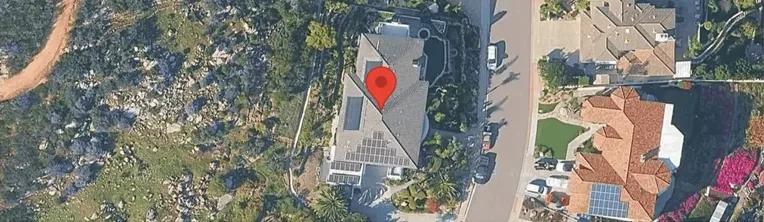
Each conversation is scoped to one property, with an aerial view and the API key you picked. The key's permissions decide what the assistant can call.Step 2: Ask, or click a workflow
One click runs a saved prompt the whole team shares. Or type a question about any part of the data: the wildfire and flood grades, the permit history, the last sale price and date.Products usedStep 3: Read the decision and the evidence
Accept with conditions, refer, or decline, with the why underneath: the hazard grades, the fire protection class, the crime grade, and the rules and manual sections it applied. Export the conversation as a PDF to keep with the file.Products used
See how teams make Property Assistant their own
Write the rules it works by
A rule is a short standing instruction the assistant follows on every answer, versioned and enabled on its own. Change one and new chats pick it up immediately, with an audit log of who changed what.
Hand it your documents
Upload manuals, guides, decline criteria, and pricing sheets. Each one is indexed into searchable sections the assistant can quote, and every citation opens the source. Documents stay encrypted and scoped to your organization.
Build your own workflows
A workflow is a saved multi-step prompt with a button label, a description, and an icon. Four come built in, every one open to edit, and you write your own in the same wizard. Anyone in your organization runs one in a click.
Get answers to what teams ask about Property Assistant
If yours isn't here, send it over and one of our engineers will answer it.
Talk to our team- What does it cost?
- When the assistant calls a PropertyLens API, your organization is billed at the same per-call rates as direct API access. Chat messages answered from context, rules, or documents, web search results, and editing workflows cost nothing.
- Can we build our own workflows?
- Yes. A workflow is a saved multi-step prompt with a button label, a description, and an icon, and anyone in your organization runs it in one click. Four come built in, Underwriting preliminary decision, Pre-inspection recommendation, Renewal risk review, and Roof condition summary, and each can be modified. You can write your own in the same wizard.
- Will it run an expensive report without asking?
- No. Long-running reports such as Roof Characteristics, RoofLens, PropertyLens Report, and Property Analysis take 10 to 45 seconds and cost more per call, and the assistant is required to ask you to confirm before sending one.Products used
- Is our content used to train models?
- No. Rules and documents are stored encrypted, scoped to your organization, and used only to answer your organization's questions. Excerpts go to our LLM provider per request under zero-retention terms, and nothing is shared with other customers or used to train third-party foundation models.
- Can we keep a record of a conversation?
- Yes. Conversations are saved in the left rail, and any one can be reopened, continued, or exported as a PDF. Rules and documents each keep an audit log with the option to revert.
- How much should we rely on an answer?
- Every response is generated on demand, and the assistant can be incomplete or wrong. Verify an output before relying on it for a binding decision. The citations and the data behind each answer are there for exactly that.
- Who can use it?
- Anyone in your organization, under the permissions of the API key they pick. You can change a key's permissions on the Account page.
See the property data behind every Property Assistant answer
Natural Perils & Hazards
Graded natural peril exposures, expected annual losses, and damaging event history
Property Characteristics
Building details, MLS listing with images, lot, mortgage, owner, parcel, tax assessments, valuation, and foreclosure status
Building Permits
Historical building permit records, deduplicated across providers
RoofLens
Roof condition, lifespan, issue detection, weather risks, and aerial imagery. PDF or JSON.
Residential Replacement Costs
Residential replacement cost with materials, labor, overhead, profit, and debris removal
PropertyLens Report
Our full consumer-facing PropertyLens report, available as PDF or JSON.
Put Property Assistant on your next submission.
Create a free account, enter an address, and ask.